Feature guide · recorded in the Venura app
Stop double bookings with a hall-by-hall booking calendar
Every confirmed booking sits on one calendar by hall and time. When someone picks a hall and time that is already taken, Venura stops them and shows whose booking it is.
- Pick a date
- Pick a hall and time
- Clash check
- Booking confirmed
The calendar and the double-booking check are in every plan; the free plan covers 40 confirmed bookings a financial year. Every Pro feature is free for the 30-day trial.
By Sumeet Yadav · Co-Founder & CTO, Venura · checked in the app on 8 November 2026
Set these up once
Your halls
Add each hall or lawn with its rent. Bookings, the calendar filter and the clash check all work hall by hall.
Account → Business Setup → Venue Settings
Conflict Detection
On by default: a booking on the same hall at an overlapping time is blocked. Only the owner can switch it off.
Account → Business Setup
Your team
Add staff so everyone books from the same calendar, each with the access you give them.
Team
Step by step
1See the month at a glance
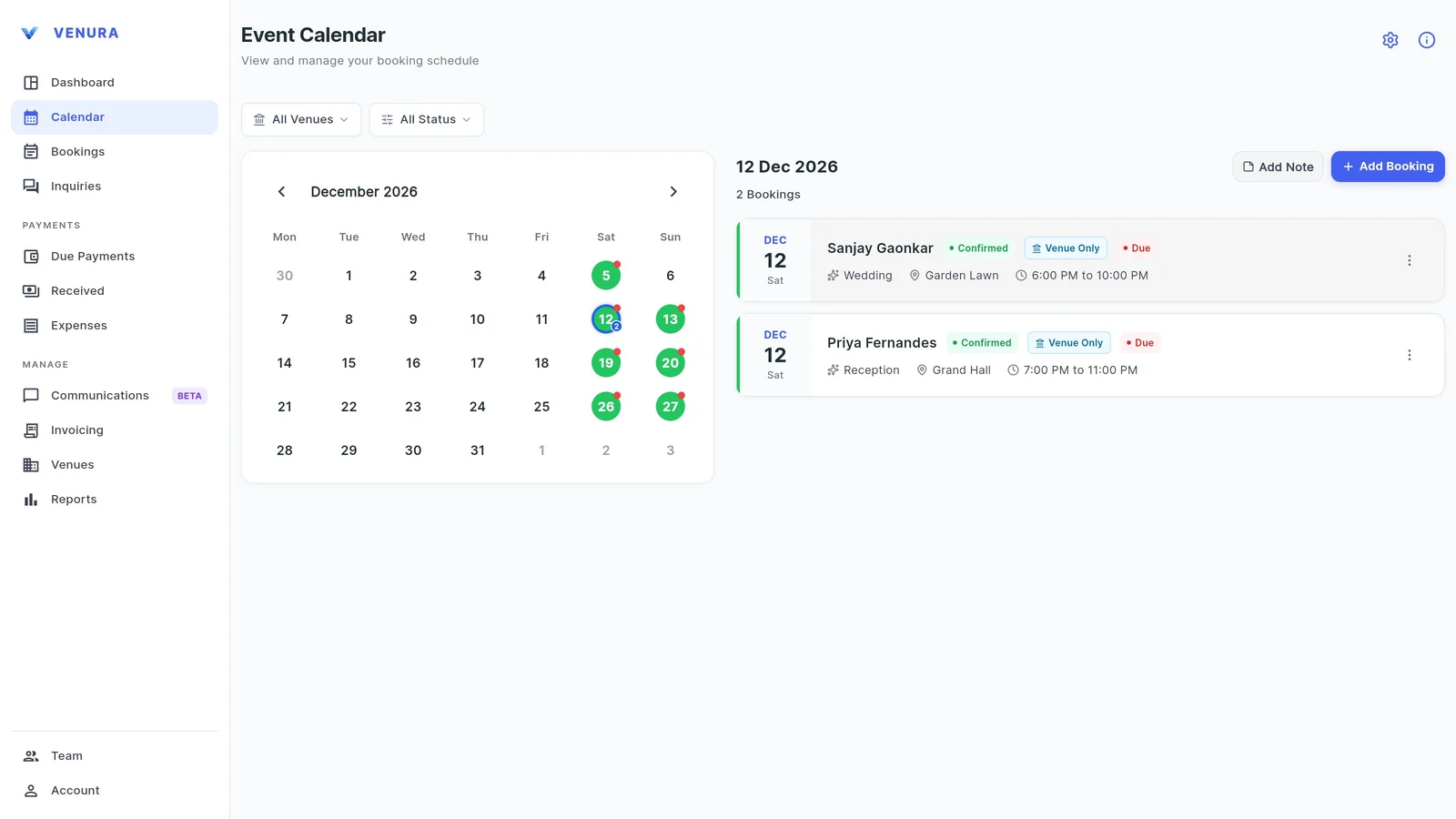
Calendar marks every day that has a confirmed booking. A red dot means a confirmed booking on that day still has an amount due.
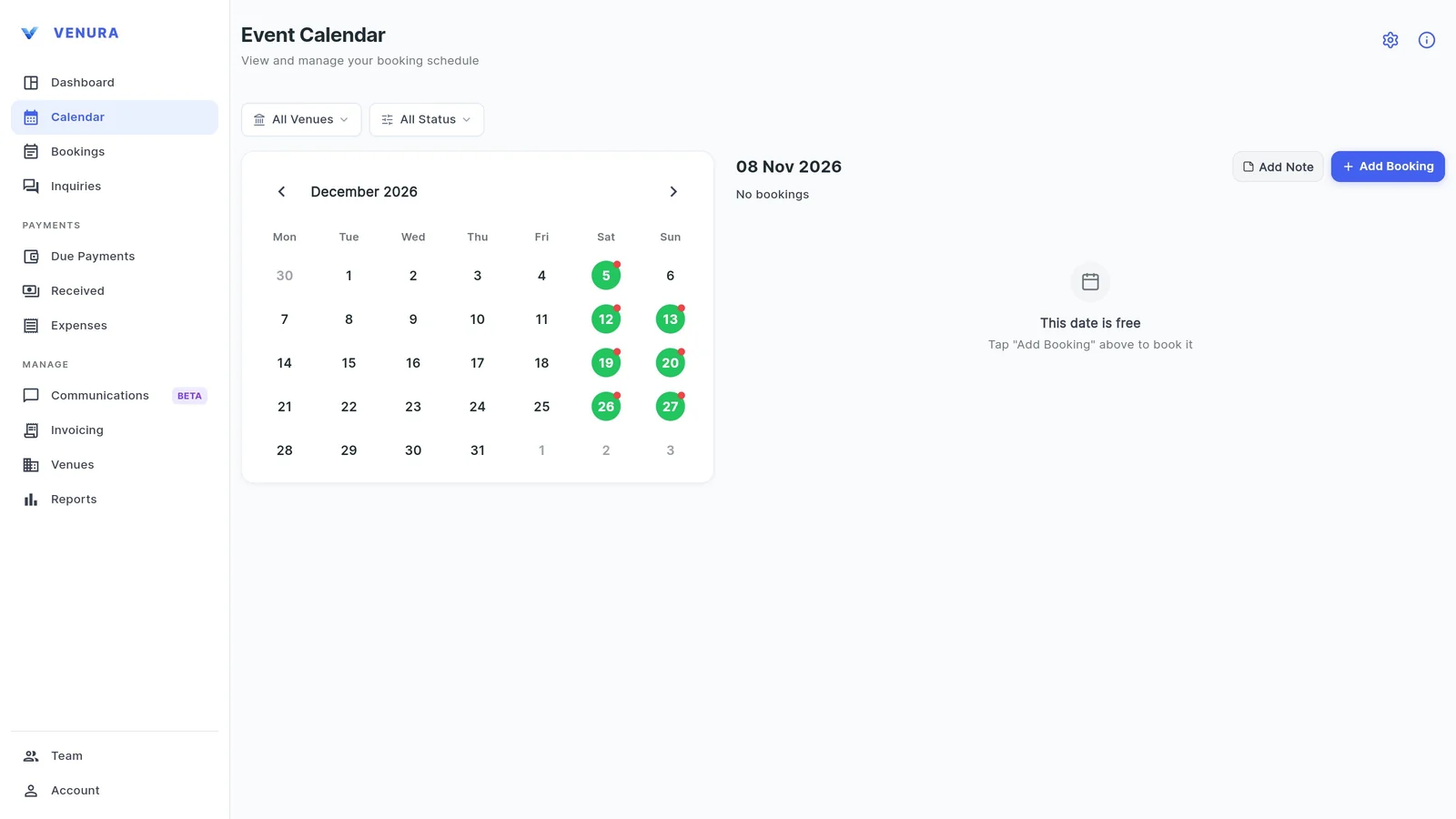
2Tap a date
The day's bookings show the client, occasion, hall and time, with the payment status. Add Booking and Add Note work for that date.
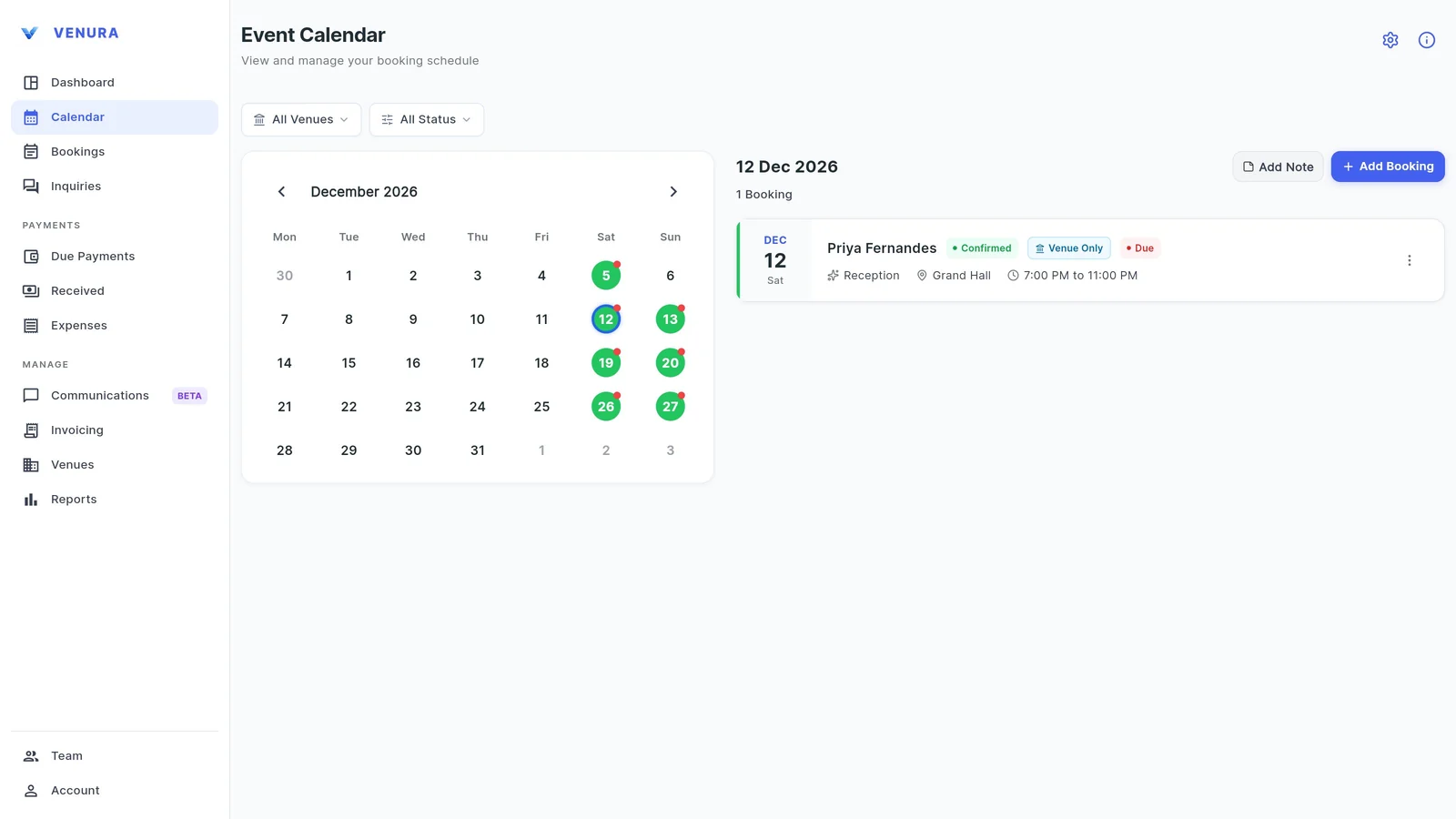
3Filter by hall
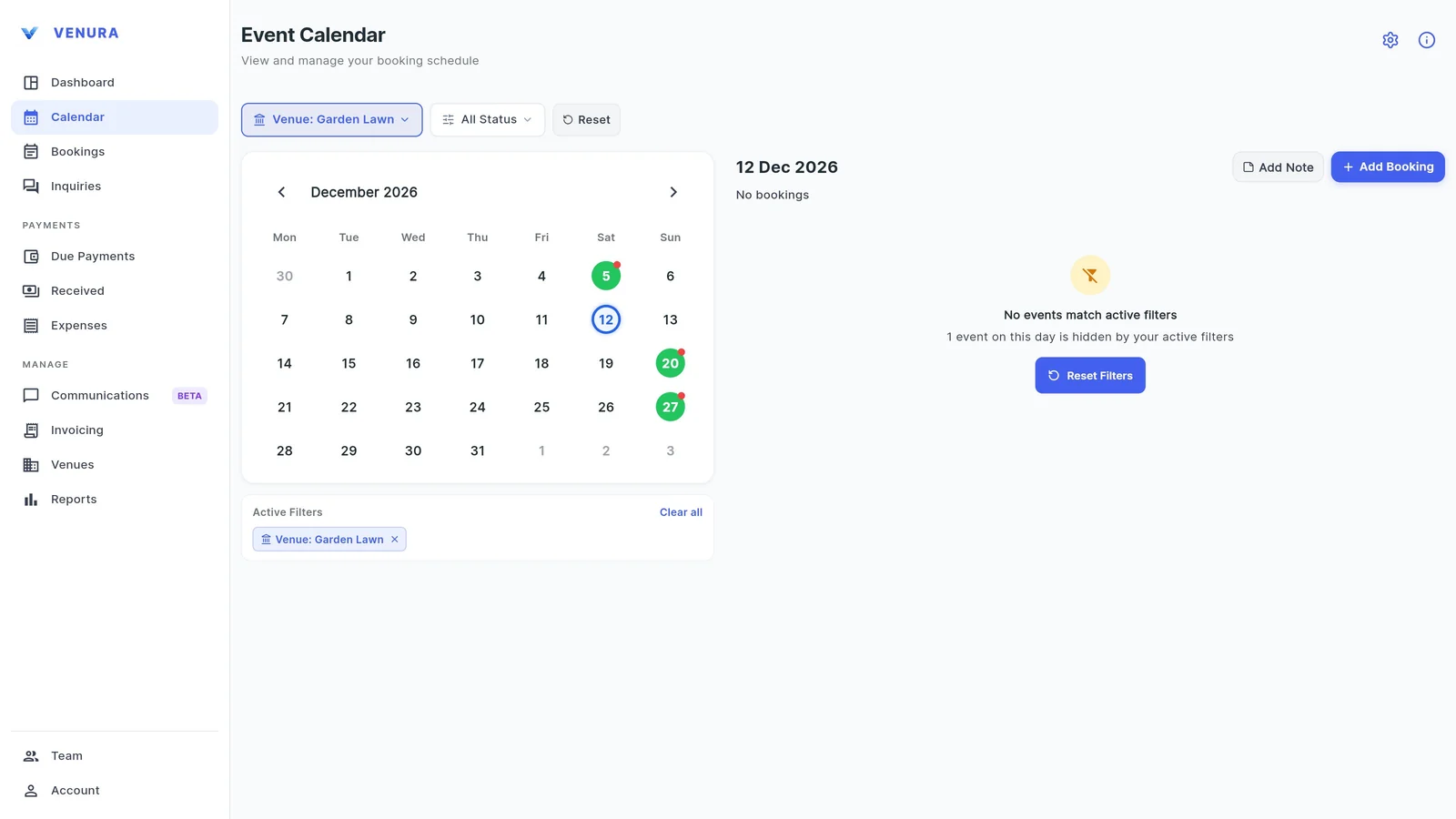
Pick a hall in the venue filter to see only its bookings. Here the Garden Lawn is free on 12 December even though the Grand Hall is booked. The status filter shows confirmed bookings, enquiries or cancellations.
4The clash check
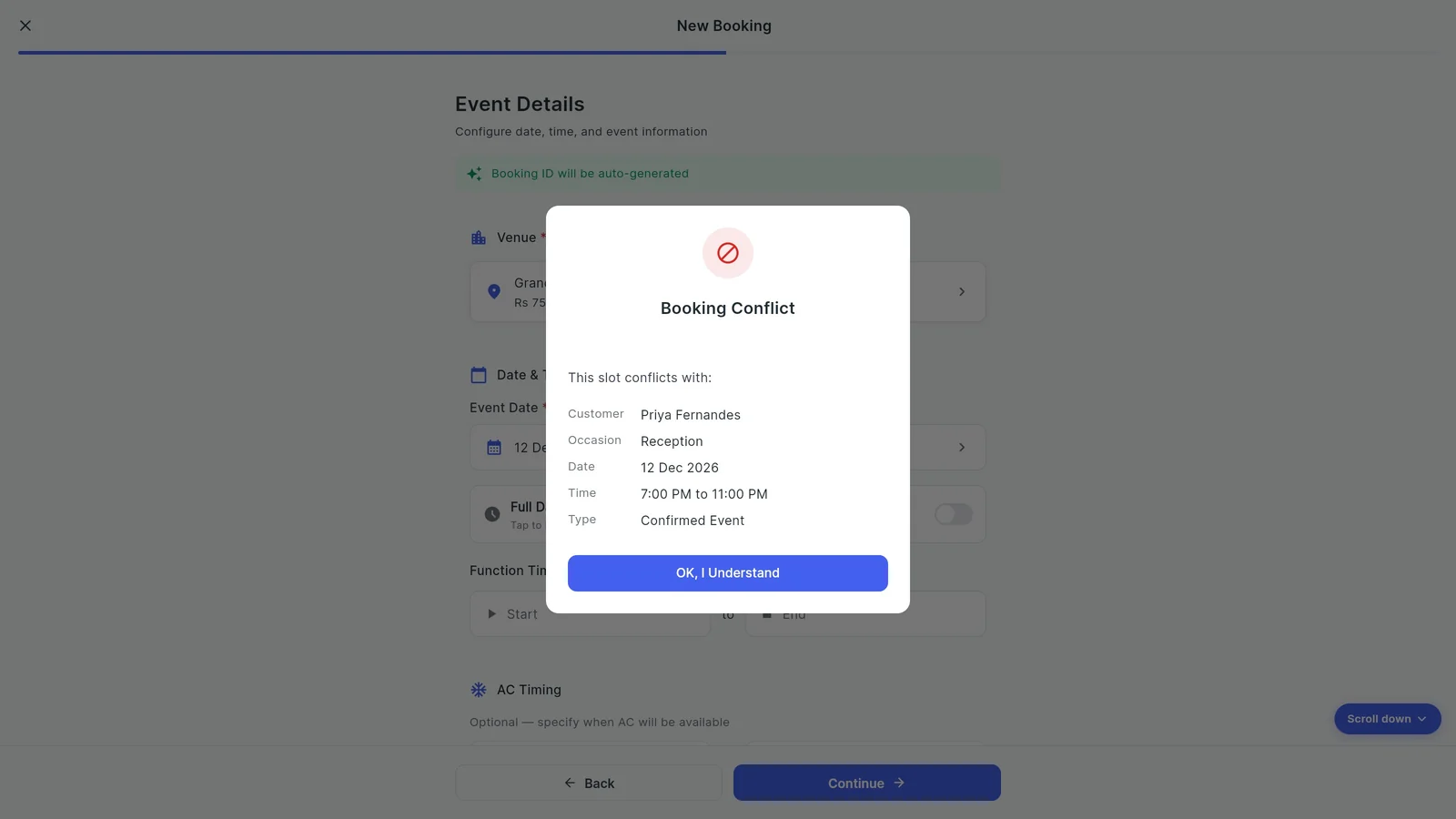
Start a booking, choose the hall and the start and end time. If a confirmed booking already holds that hall at an overlapping time, Booking Conflict opens with that booking's client, occasion, date and time, and the time you picked is cleared.
5Try another hall or time
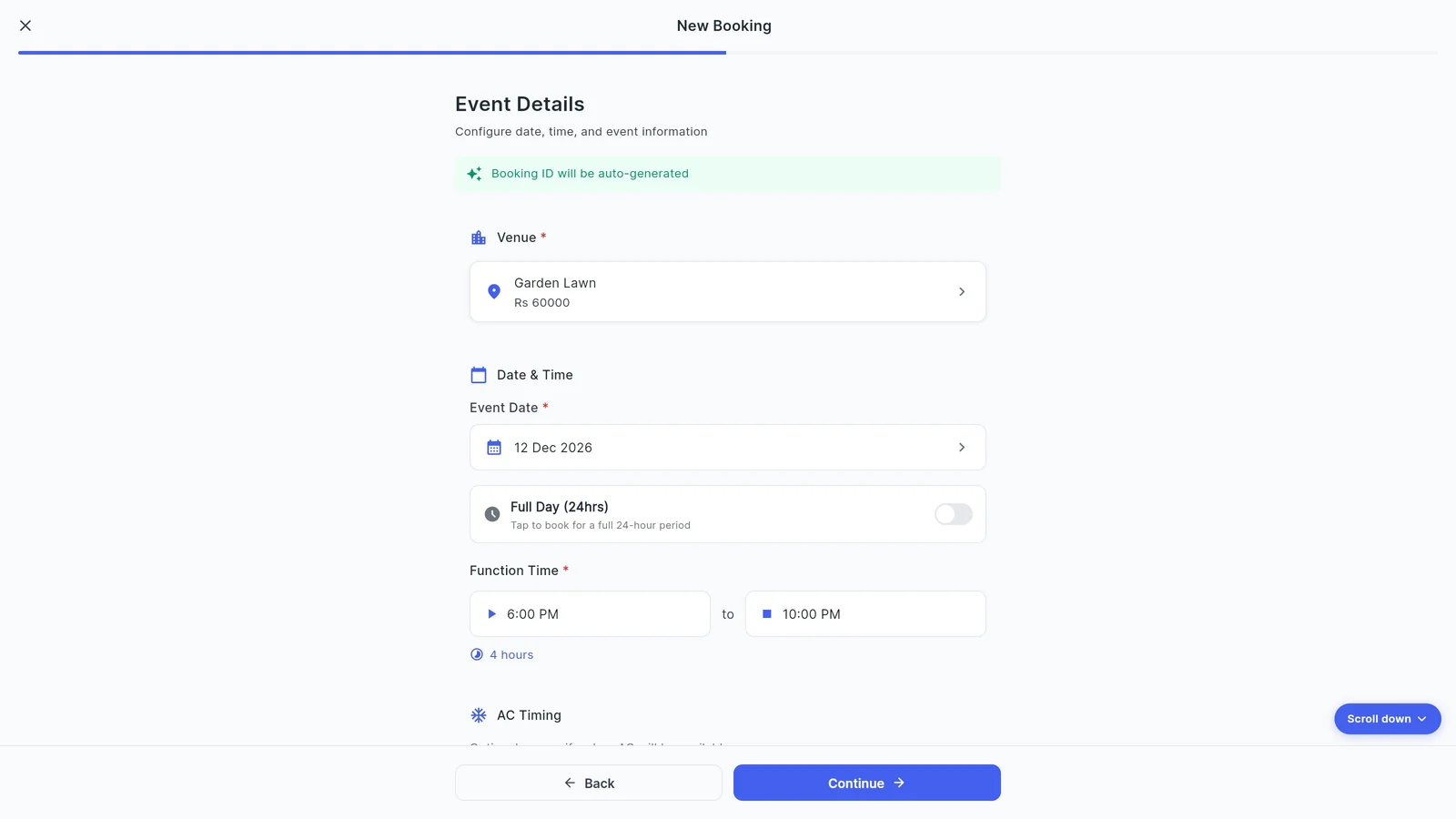
Switch to a free hall or another time and it goes through. The booking shows its length, here 4 hours.
6Both bookings, no clash
After you confirm, the date shows both events: one in the Grand Hall and one on the Garden Lawn.
How to avoid double booking at a banquet hall
Most double bookings come from two people taking bookings from different diaries. These habits stop them; the second column shows how Venura handles each.
| On the booking calendar | In Venura |
|---|---|
| Keep one calendar that everyone books from | One Calendar for you and your team |
| Book a hall and a time, not just a date | Every booking has its halls and a start and end time, or Full Day |
| Check the slot before you promise it | Checked against confirmed bookings when the time is picked and again on save |
| Watch late events that run past midnight | An end time after midnight counts into the next day |
| Keep enquiries separate from confirmed dates | Enquiries do not block a slot; a confirmed booking does |
| Mark dates that need attention | Add Note on a date; a red dot shows money still due |
Register, spreadsheet or booking calendar?
- Paper or Excel register
- Fine for one hall and one person taking bookings. Nothing warns you about a clash.
- Free paper or excel register format →
- Free calendar tool
- Plan morning and evening slots in the browser, without an account.
- Free free calendar tool format →
- Venura calendar
- Shared with your team, and every booking is checked against its hall and time.
- Free venura calendar format →
Good to know
- Only confirmed bookings block a slot. An enquiry holds nothing until you confirm it.
- The check runs when the time is picked and again just before the booking or enquiry is saved. It is not a lock: two people saving the same slot at the same moment on different devices can both get through.
- Without internet the check uses the bookings saved on the device and says so.
- The owner can switch Conflict Detection off; then bookings can share a slot.
See a real Venura booking calendar, or start from a template
More free formats: Free booking calendar · Booking register in Excel · Muhurat planner
Booking calendar and double-booking check: common questions
How does Venura stop double bookings?
When you pick a hall and time for a booking, Venura checks it against the confirmed bookings for that hall. If the times overlap, Booking Conflict opens with the other booking's details and the time is cleared.
Can two events happen on the same date in different halls?
Yes. The check is per hall, so the Grand Hall and the Garden Lawn can both be booked on the same evening.
Can I book the same hall twice on one day?
Yes, if the times don't overlap, such as a lunch and a dinner. A Full Day booking blocks the whole day.
Does an enquiry block the date?
No. Only a confirmed booking blocks a hall. An enquiry for a hall and time that is already confirmed is stopped when you save it.
What about events that go past midnight?
An end time earlier than the start time is counted into the next day, so a 7 PM to 1 AM booking also blocks the early hours of the next date.
Can I see only one hall's bookings?
Yes. Choose the hall in the venue filter on the Calendar. The status filter shows confirmed bookings, enquiries or cancellations.
Keep learning
More feature guides
- Make a banquet quotation and send it on WhatsApp
- Record a booking advance and send the receipt on WhatsApp
- Make a GST invoice from a confirmed banquet booking
- Track every banquet enquiry until it becomes a booking
- Export banquet bookings and payments to Tally
- Give staff only the access they need, and see who changed what
- Track event expenses and see your real profit
- Build catering menus and per-plate packages, and send the quote
- Give your venue its own website with live availability
Keep every date clash-free with Venura
Every Pro feature is free for 30 days. No card needed.
Ready to modernize your event business?
Explore the Venura ecosystem or speak with our team.