Feature guide · recorded in the Venura app
Build catering menus and per-plate packages, and send the quote
Keep every dish on one menu, build packages with a price per guest, and preview a branded package quotation PDF to send the family.
- Menu
- Package
- Price per guest
- Quotation PDF
Recorded in the Venura venue app with the catering module on; the Venura Catering app has the same Menu and Packages screens. Choose catering when you sign up. Every Pro feature is free for the 30-day trial.
By Sumeet Yadav · Co-Founder & CTO, Venura · checked in the app on 8 November 2026
Set these up once
Your logo and address
The package PDF takes your logo, business name, address, phone and GSTIN from your profile.
Account → Business Profile
Your menu
Add dishes yourself, or send your menu on WhatsApp from the Catering screen and the Venura team enters it for you.
Catering → Menu
Step by step
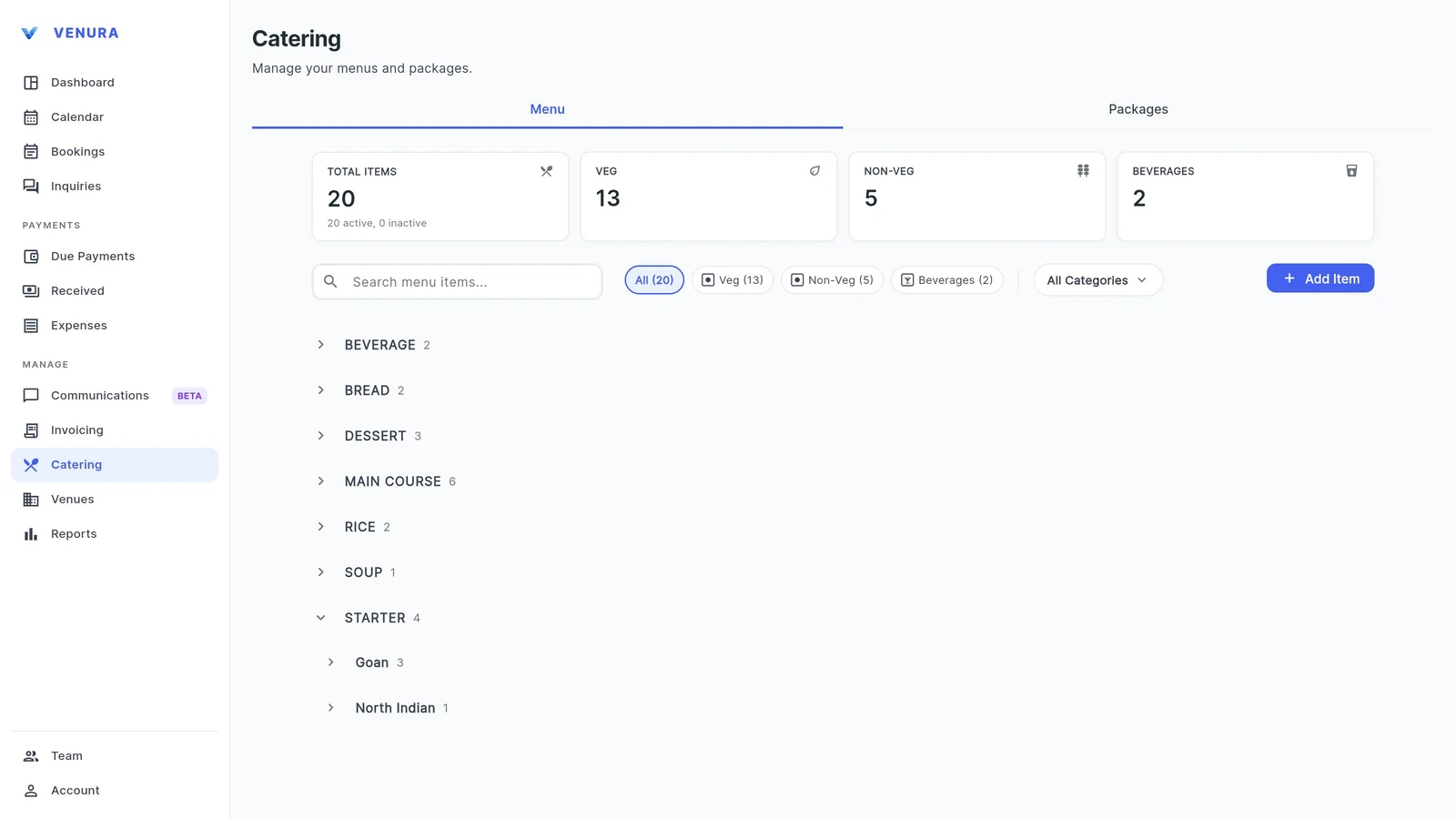
1See your menu
Catering → Menu lists every dish by category, such as Starter, Main Course, Bread, Rice, Dessert and Beverage, with sub-groups like Goan or North Indian. Counts at the top show veg, non-veg and beverages, and you can filter or search.
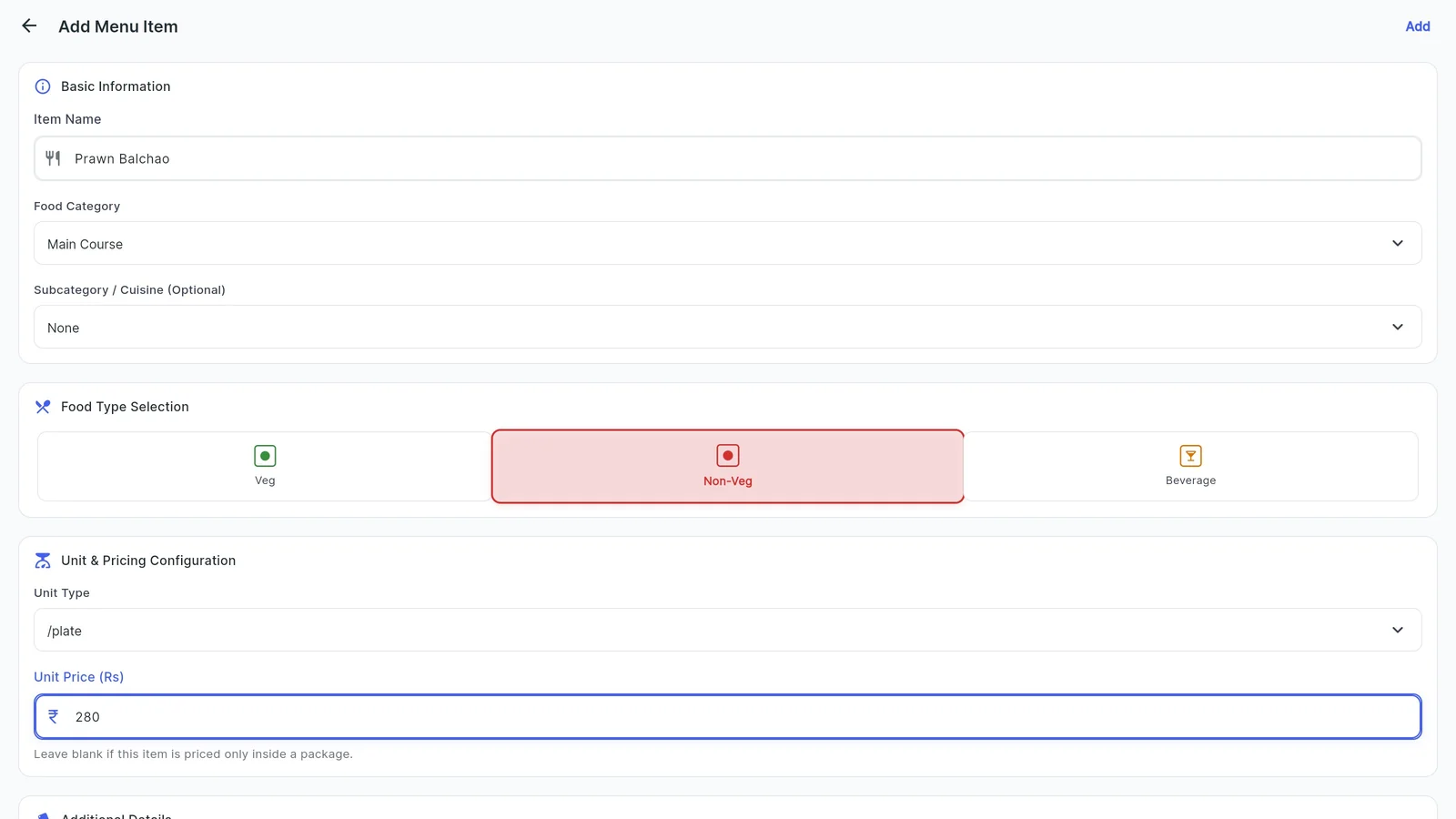
2Add a dish
Tap Add Item: the name, food category, an optional sub-category or cuisine, Veg, Non-Veg or Beverage, the unit (plate, piece, kg and more) and the price. Leave the price empty if the dish is only sold inside a package.
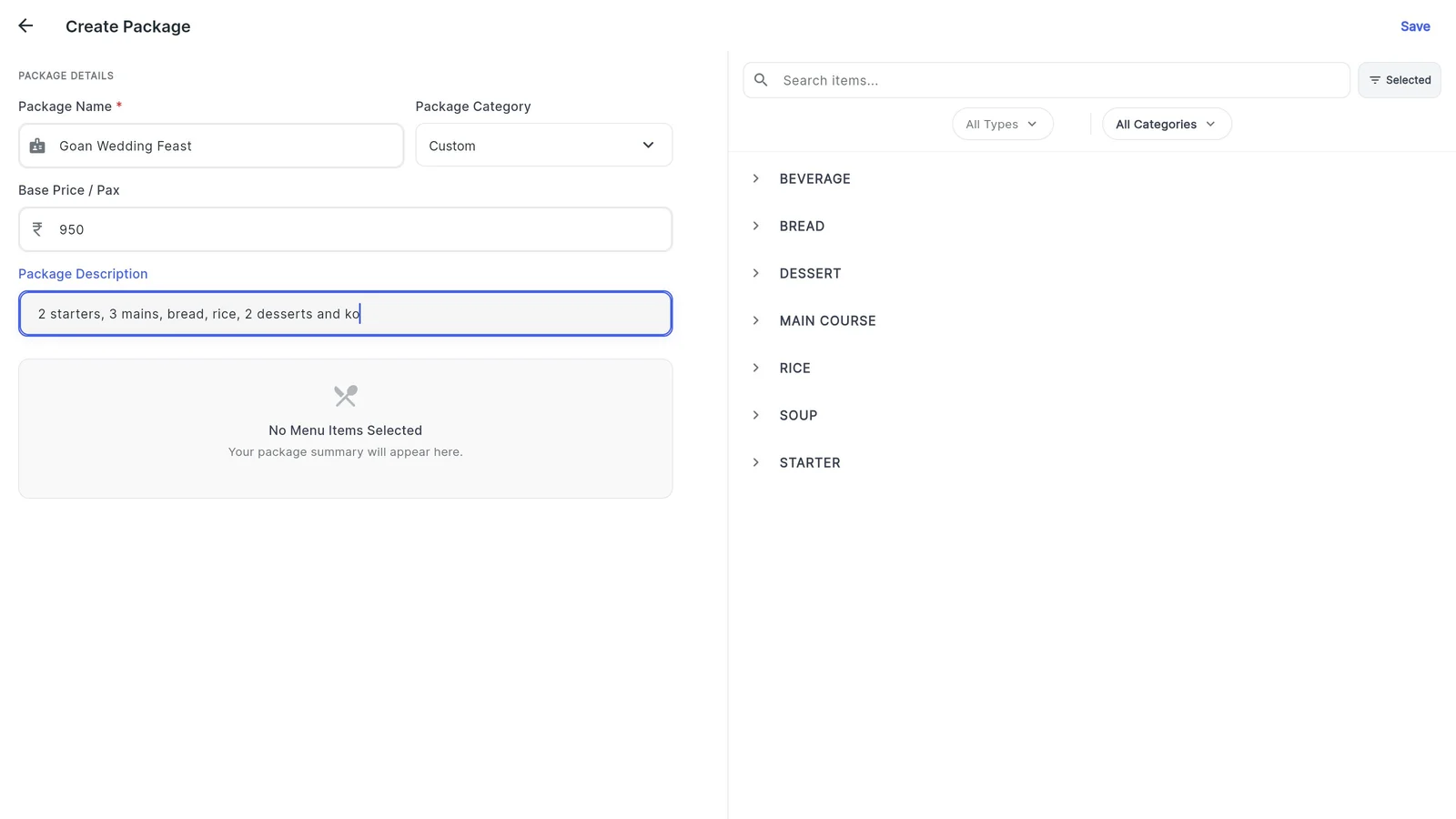
3Create a package
In Packages, tap Create Package. Give it a name, a category, the base price per guest and a short description of what is included.
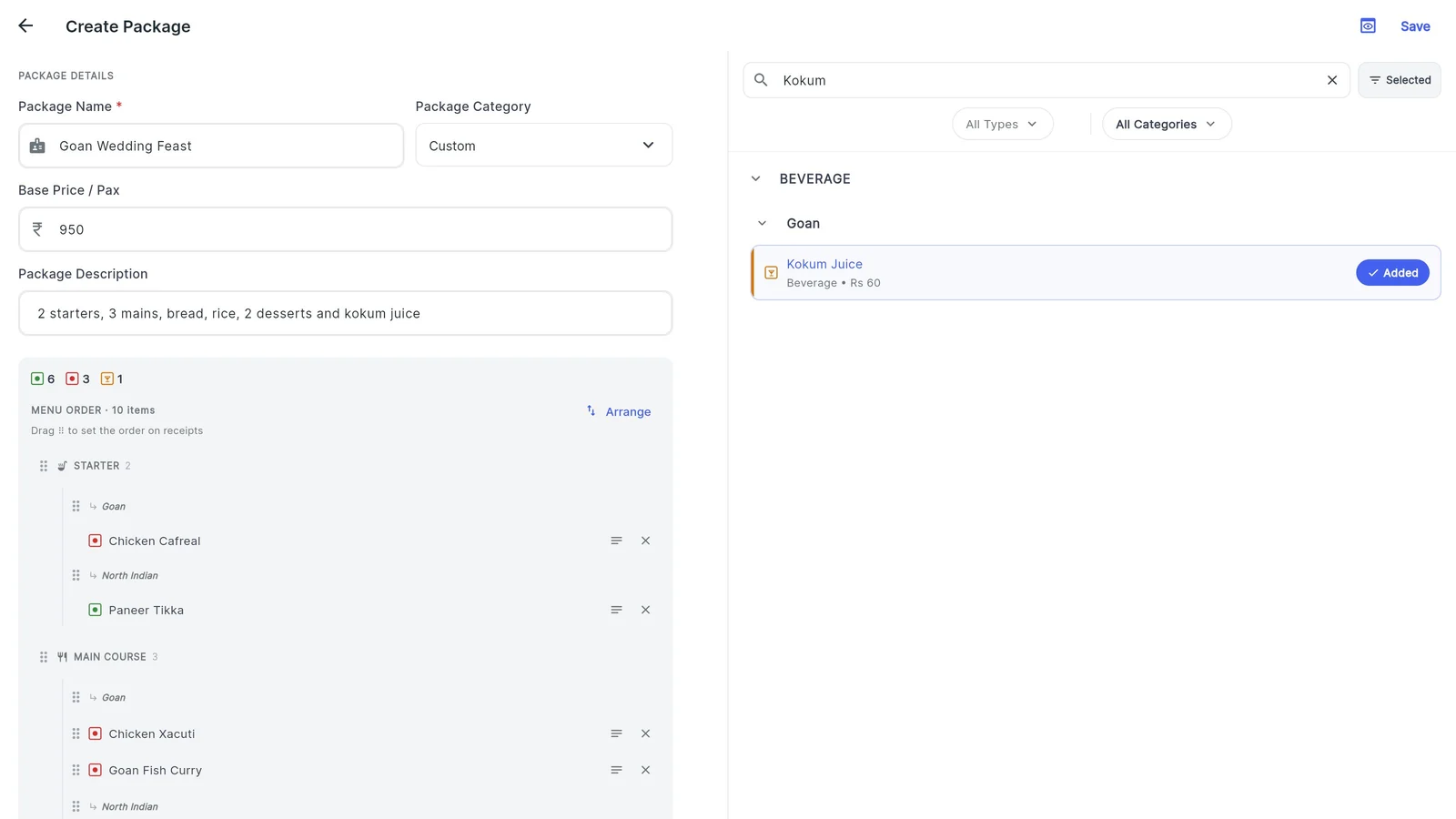
4Pick the dishes
Search your menu and add dishes. The package lists them course by course with veg and non-veg markers, and you can add chef notes or rearrange the order.
5Preview the package quotation
Preview Quotation PDF shows PACKAGE QUOTATION with your logo, address and GSTIN, the price per guest, the inclusions and the full menu by course. Download it or share the PDF.
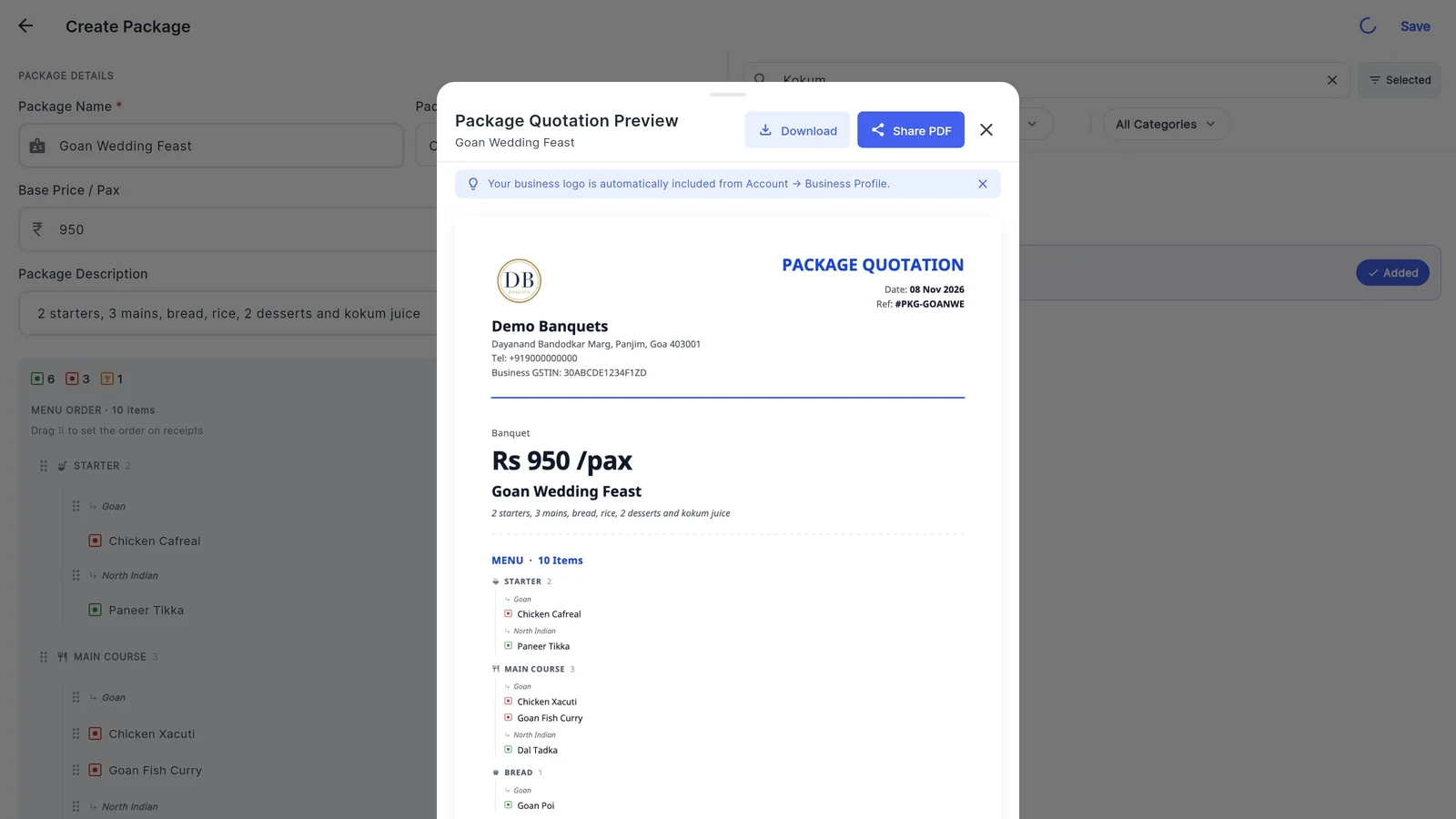
What a catering package quotation should show
Families compare packages side by side. Make sure yours answers these; the second column shows where each comes from in Venura.
| On the package quotation | In Venura |
|---|---|
| Your name, logo, address and GSTIN | From your business profile |
| Package name and price per guest | Package Name and Base Price / Pax |
| What is included, in one line | Package Description |
| Every dish, grouped by course | Menu by category and sub-category |
| Which dishes are veg and non-veg | Veg, non-veg and beverage markers and legend |
| A date and reference number | Date and Ref on the PDF |
Package quotation or booking quotation?
- Package quotation
- Your standard menu and price per guest, to share early. No tax lines.
- Free package quotation format →
- Booking quotation
- For one event: date, guests, meals and GST, with your terms.
- Free booking quotation format →
Good to know
- Dish prices are selling prices. There is no cost price, so the app does not work out food cost or margin.
- The package PDF has no tax lines or per-dish prices; GST appears on the booking quotation and invoice.
- Venura does not print kitchen order tickets (KOTs) or grocery lists.
See a real Venura package quotation, or start from a template
More free formats: Catering quotation format · Free catering quotation builder
Catering menus and packages: common questions
Can I keep veg and non-veg dishes separate?
Yes. Each dish is Veg, Non-Veg or Beverage, the menu shows a count of each, and the package PDF marks every dish.
Do I have to type in my whole menu?
No. You can send your menu on WhatsApp from the Catering screen and the Venura team enters it, or add dishes yourself.
How is a package priced?
With a base price per guest. When you add a package to a booking's meal, that price fills the per-plate rate, which you can change.
Can I send the package to a family?
Yes. Preview Quotation PDF, then Download or Share PDF.
Does it calculate my food cost or grocery list?
No. Dishes carry a selling price only, and Venura does not make grocery lists or KOTs.
Keep learning
More feature guides
- Make a banquet quotation and send it on WhatsApp
- Record a booking advance and send the receipt on WhatsApp
- Make a GST invoice from a confirmed banquet booking
- Stop double bookings with a hall-by-hall booking calendar
- Track every banquet enquiry until it becomes a booking
- Export banquet bookings and payments to Tally
- Give staff only the access they need, and see who changed what
- Track event expenses and see your real profit
- Give your venue its own website with live availability
Answers for venue owners
All answersQuote your next catering package from Venura
Every Pro feature is free for 30 days. No card needed.
Ready to modernize your event business?
Explore the Venura ecosystem or speak with our team.